Scan chain is used to find stuck at faults in the
design, it involves 3 stages:
By enabling Scan enable (SE =1) if we pass “101” (test vectors) through Scan_in & shift a pattern using clk , then at the 3rd clock pulse we will get “11” inputs of faulty gate.See below table
This whole Scan_in cycle phase is known as Shift in.
The same cycle repeat for each and every node where fault can occur.As testing contribute more than 50% cost of chip in which testing time plays a crucial role, so to reduce test time we have to increase the shift frequency but there is a trade off with power dissipation.
During scan mode toggling of flops & combinational logic block will be there which are a part of large scan chain leads to dynamic power dissipation & temperature hotspots around that region which can create some new violating paths.
So testing is done only in low frequency mode by taking care of test time & power dissipation in mind.
Please let me know if you any doubts in this specific post. In the next post we will discuss about the Scan chain length & reordering concept. Stay Blessed :)
- Shift-In
- Capture
- Shift-Out
In the last post we have discussed about the Scan chain, For better understanding of this post i will recommend you to visit my previous blog on Scan chain.
Lets discuss each stage one by one
Shift-IN
Let us consider the circuit shown in figure 1 to demonstrate how the scan chain functions,having 7 primary inputs (including clk & Scan_enable), assuming output of AND gate SA-0
Let us consider the circuit shown in figure 1 to demonstrate how the scan chain functions,having 7 primary inputs (including clk & Scan_enable), assuming output of AND gate SA-0
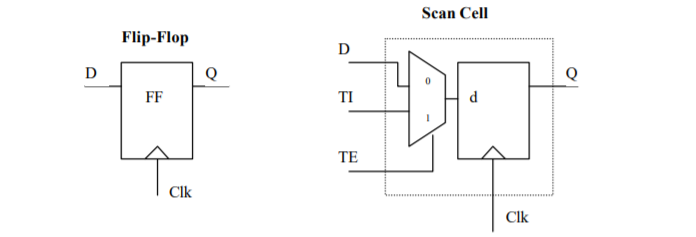
- When SE = 0, it will act in normal mode & Scan flops will get the input from the D pin of mux which has connected to the logic cone.
- When SE = 1, flops will get input from T1 pin of mux, the output of one flop is connected to next input of flop acting as a shift register.
As we can see that we don’t have direct controlability on the input pins of faulty gate, we have to use scan chain to pass the test vectors to it.
Inputs of faulty AND gate = QFF1 + QFF3
Inputs of faulty AND gate = QFF1 + QFF3
 |
| Figure 1 |
By enabling Scan enable (SE =1) if we pass “101” (test vectors) through Scan_in & shift a pattern using clk , then at the 3rd clock pulse we will get “11” inputs of faulty gate.See below table
CLk
|
FF1
|
FF2
|
FF3
|
0
|
X
|
X
|
x
|
1
|
1
|
X
|
X
|
2
|
0
|
1
|
X
|
3
|
1
|
0
|
1
|
This whole Scan_in cycle phase is known as Shift in.
Capture
This is the second phase in the scan mode operation known as Capture. After the successfully shifting of test vectors in the design
we have to capture the output of faulty AND gate.
For this we have to do:
· Disable the Scan_enable( SE =0)
· Disable the Scan_enable( SE =0)
When SE = 0, flops will act in normal mode ,so during
this period the “d” input of the flop gets its input from the output of combinational logic,i.e FF2 input gets from the output of faulty gate.
· Apply one clock pulse to latch data QFF2
Applied one clock pulse which will latch the FF2 flop data, which we are trying to observe.
Shift-Out
This is the 3rd phase of scan mode operation in
which we will observe the output of FF2. As QFF2 is internal to design, we have to enable Scan
mode again (SE = 0) which helps in shifting data bit by bit with clk until it pops out from scan_out.
The number of clock pulses that are to be applied for shifting the value depends on how deep the capturing flop lies in the circuit. Output from scan_out is compared with the expected value , if its not match we can conclude that there is some problem with the element that drives it, i.e if logic 0 pops out from scan_out we can conclude that Gate is SA-0. Figure 2 shows the sequence of events that take place during scan-shifting & scan-capture.
The number of clock pulses that are to be applied for shifting the value depends on how deep the capturing flop lies in the circuit. Output from scan_out is compared with the expected value , if its not match we can conclude that there is some problem with the element that drives it, i.e if logic 0 pops out from scan_out we can conclude that Gate is SA-0. Figure 2 shows the sequence of events that take place during scan-shifting & scan-capture.
 |
| Figure 2: Waveform |
The same cycle repeat for each and every node where fault can occur.As testing contribute more than 50% cost of chip in which testing time plays a crucial role, so to reduce test time we have to increase the shift frequency but there is a trade off with power dissipation.
During scan mode toggling of flops & combinational logic block will be there which are a part of large scan chain leads to dynamic power dissipation & temperature hotspots around that region which can create some new violating paths.
So testing is done only in low frequency mode by taking care of test time & power dissipation in mind.
Please let me know if you any doubts in this specific post. In the next post we will discuss about the Scan chain length & reordering concept. Stay Blessed :)